
Peatus1.6.2 - Google Play
You'll be able to see results in few seconds.
Publisher Description
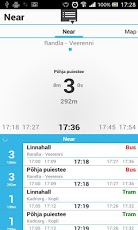
Peatus app is created for Tallinn city citizens who use city transport often.What Peatus can do:-Find near stops, and show it according to time when next bus, tram or trolleybus will come.-Show on map where is nearest stops (Internet should be turned it to use this feature).-Set timer, how much time left for next bus/tram/trolleybus, just press on stop in "near" list.-Find fast any lines and get fast time with scrolling interface.-Application work offline, but need firstly internet to download data!Stop loosing your time when searching your line in timetable!Enjoy~!NB! Such low memory device, like HTC Wildfire, can slow down the application.Peatus app on ideaalne rakendus Tallinna kodanikele kes kasutavad pidevalt Tallinna ühistransporti.Peatus appi abil saab:- Leida lähedalasuvad peatused ja näha sealsete busside, trollide, trammide väljumisaegu- Näha kaardil, kus on lähedalasuvad peatused- Sättida taimerid ühissõiduki järgmiseks väljumisajaks- Leida kiire otsinguga numbri järgi huvi pakkuva ühissõiduki- Rakendus töötab ka ilma internetita, kui eelnevalt on alla laetud andmedHead kasutamist!
About Peatus
The company that develops Peatus is Michael Makarov. The latest version released by its developer is 1.6.2.
To install Peatus on your Android device, just click the green Continue To App button above to start the installation process. The app is listed on our website since 2013-03-23 and was downloaded 0 times. We have already checked if the download link is safe, however for your own protection we recommend that you scan the downloaded app with your antivirus. Your antivirus may detect the Peatus as malware as malware if the download link to org.steamzone.android.peatus is broken.
How to install Peatus on your Android device:
- Click on the Continue To App button on our website. This will redirect you to Google Play.
- Once the Peatus is shown in the Google Play listing of your Android device, you can start its download and installation. Tap on the Install button located below the search bar and to the right of the app icon.
- A pop-up window with the permissions required by Peatus will be shown. Click on Accept to continue the process.
- Peatus will be downloaded onto your device, displaying a progress. Once the download completes, the installation will start and you'll get a notification after the installation is finished.
Program Details
System requirements
Download information
Pricing
Version History
version 1.6.2
posted on 2013-03-23
version 1.6.2
posted on 2013-03-23
Several fixes and updates
Disclaimer
Official Google Play Link
We do not host Peatus on our servers. We did not scan it for viruses, adware, spyware or other type of malware. This app is hosted by Google and passed their terms and conditions to be listed there. We recommend caution when installing it.
The Google Play link for Peatus is provided to you by apps112.com without any warranties, representations or guarantees of any kind, so access it at your own risk.
If you have questions regarding this particular app contact the publisher directly. For questions about the functionalities of apps112.com contact us.
